Kubera vs Empower
Free, US-only and built to introduce you to a wealth manager, against $250 a year, worldwide, with nobody calling. Including where Empower is the better pick.


ASK AI
about kubera
about kubera
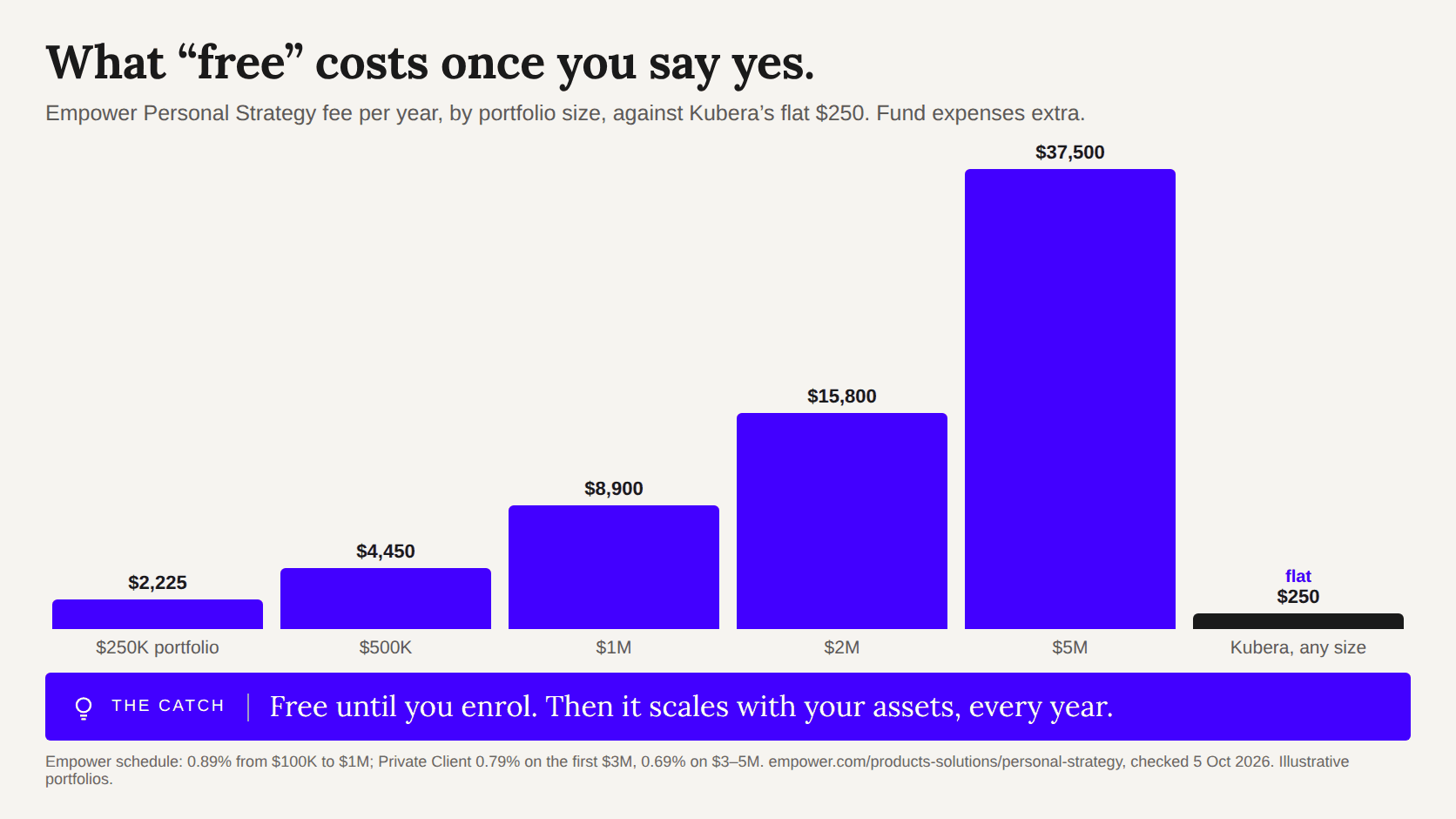
Empower Personal Dashboard (the old Personal Capital) is free, US-only and exists to introduce you to a wealth manager who charges 0.89% a year. Kubera is $250 a year, connects to banks in 40+ countries, holds any currency and crypto, and nobody calls you. Here is the whole comparison, including where Empower is the better pick.
Facts checked on 5 October 2026. Competitor prices and limits come from their own sites and help centres where they publish them; where they do not, the page says who reported the figure.
| Kubera | Empower | |
|---|---|---|
| Price | Essentials $250 a year. Black $2,500 a year for multi-entity wealth. Pricing | Dashboard free. Managed investing (Personal Strategy) 0.89% of assets a year from $100K to $1M, stepping down to 0.49% above $10M, plus fund expenses. |
| Business model | Subscription only. No ads, no data sales, no financial products. | The free dashboard feeds adviser sales: eligible users are offered a consultation that “may result in an offer to enroll”. A phone number at signup agrees to marketing calls and texts. |
| Countries and currencies | Banks and brokerages in 40+ countries through nine aggregators. Any asset in any currency; exchange rates refreshed every two hours. | US institutions only, USD only. Foreign accounts can be added manually. Registration needs a US phone number. |
| Crypto | 20+ exchanges, hardware wallets, 18 chains by wallet address, DeFi positions on Ethereum, BSC and Polygon, NFTs. | Manual only: pick a coin, type a quantity. Prices every eight hours. No exchange or wallet connections. |
| Private investments | Private stock, LP positions, fund commitments with a capital-call and distribution schedule, IRR per position, documents attached. | Manual accounts with a value; no commitment schedule or per-position IRR. |
| Manual assets | Homes, cars, jewelry, watches, gold, collectibles, loans you have made. Live price feeds and an AI appraiser keep values current. | Manual accounts for a home, car, rental, art, jewelry; Zillow home value. |
| History | A daily snapshot of everything from the day you connect, forever. | New connections pull one to three months of transactions; no history import from spreadsheets. |
| Family and entities | Collaborators on every plan. Nested portfolios and ownership tags for trusts and LLCs on Black. | A single household view; no entity structures. |
| AI | Connect your balance sheet to ChatGPT, Claude, Grok and other assistants, read-only. | No assistant connection. |
| If you die | Dead Man’s Switch: after a period of inactivity your data goes to the person you named. | None. |
| Mobile | Web app on iPhone and Android home screens; best for viewing. | Native iOS and Android apps. |
| Budgeting | None, on purpose. | Basic cash-flow and spending views. |
Empower does not charge for the dashboard because the dashboard is not the product. Empower’s own terms say eligible users receive a consultation with an adviser which “may result in an offer to enroll” in its wealth-management service, priced at 0.89% of assets a year up to $1 million. On a $2 million portfolio that is $17,800 a year before fund expenses.
That is a fair trade if you want an adviser. If you do not, the dashboard still works, and you can decline the calls, but the product is built around that funnel: a phone number is required at signup, and giving it agrees to marketing calls and texts. Kubera charges $250 a year and has no second product to sell you. The subscription is the whole business.
Empower connects to US institutions only and shows everything in dollars. An account in London, Toronto, Singapore or Mumbai goes in by hand, at whatever value you typed, in USD. If that describes none of your money, this row does not matter to you.
Kubera connects through nine aggregators (Plaid, Yodlee, MX, Akoya and Mastercard in North America; Salt Edge in the UK and Europe; Lean in the Gulf; Akahu in New Zealand; SnapTrade for brokerages) and lists 20,000+ institutions across 40+ countries. Any asset can be held in its own currency; the balance sheet converts to your base currency at rates refreshed every two hours. For the handful of banks no aggregator reaches, Web Sync keeps the balance current without you re-typing it.
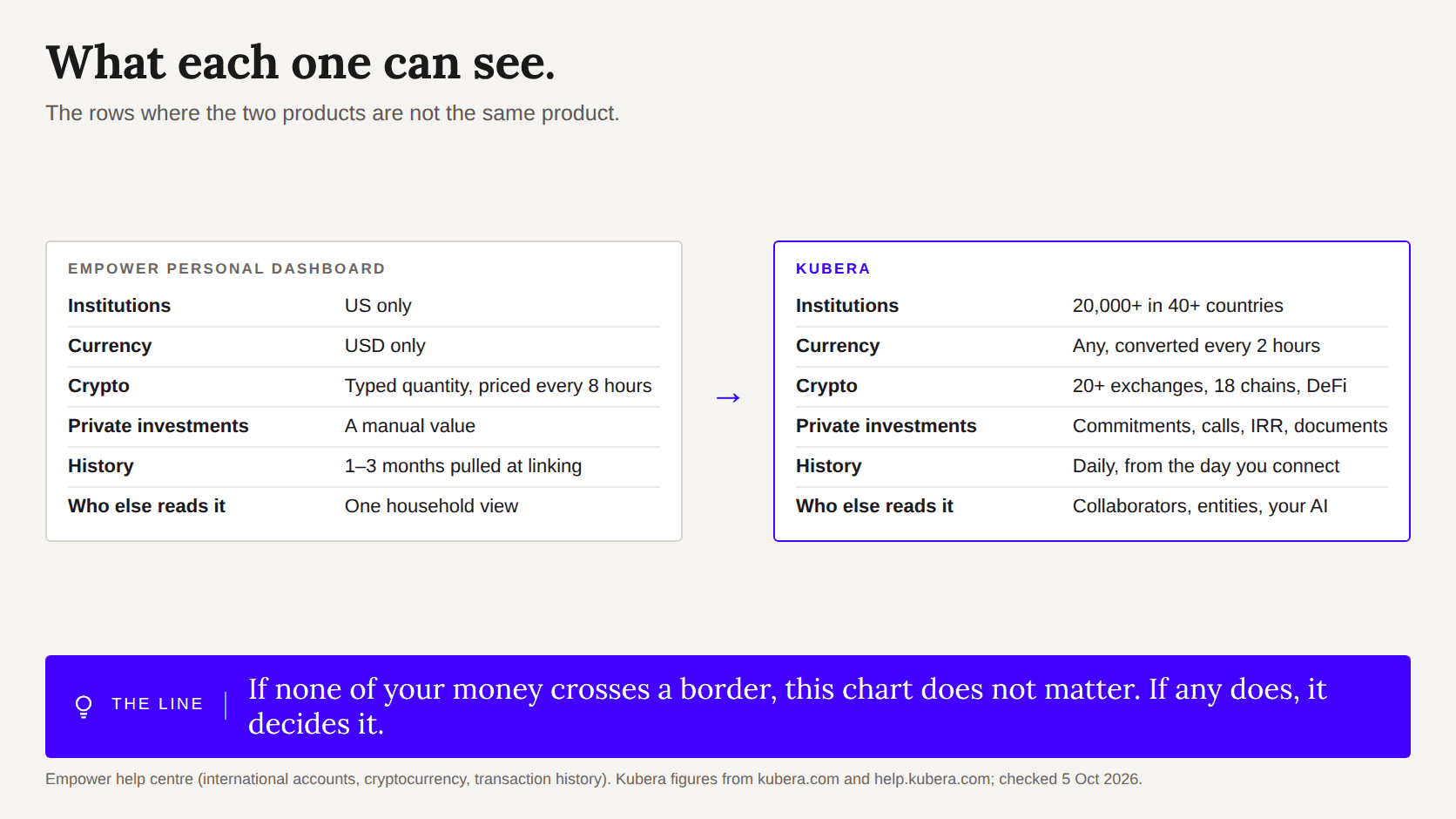
On Empower, crypto is a manual account: you choose the coin, type the quantity, and the price updates every eight hours. Nothing connects to an exchange or a wallet. Kubera connects to 20+ exchanges, Ledger and Trezor, and reads 18 chains by wallet address, including DeFi positions and NFTs, so a staked position or a liquidity pool shows up at its current value next to your index funds.
The same gap applies to private investments. Empower can hold a manual account called “Fund III” with a number in it. Kubera holds the commitment, the calls and distributions on a schedule, the IRR of the position, and the documents, and feeds the unfunded commitment into your cash forecast.
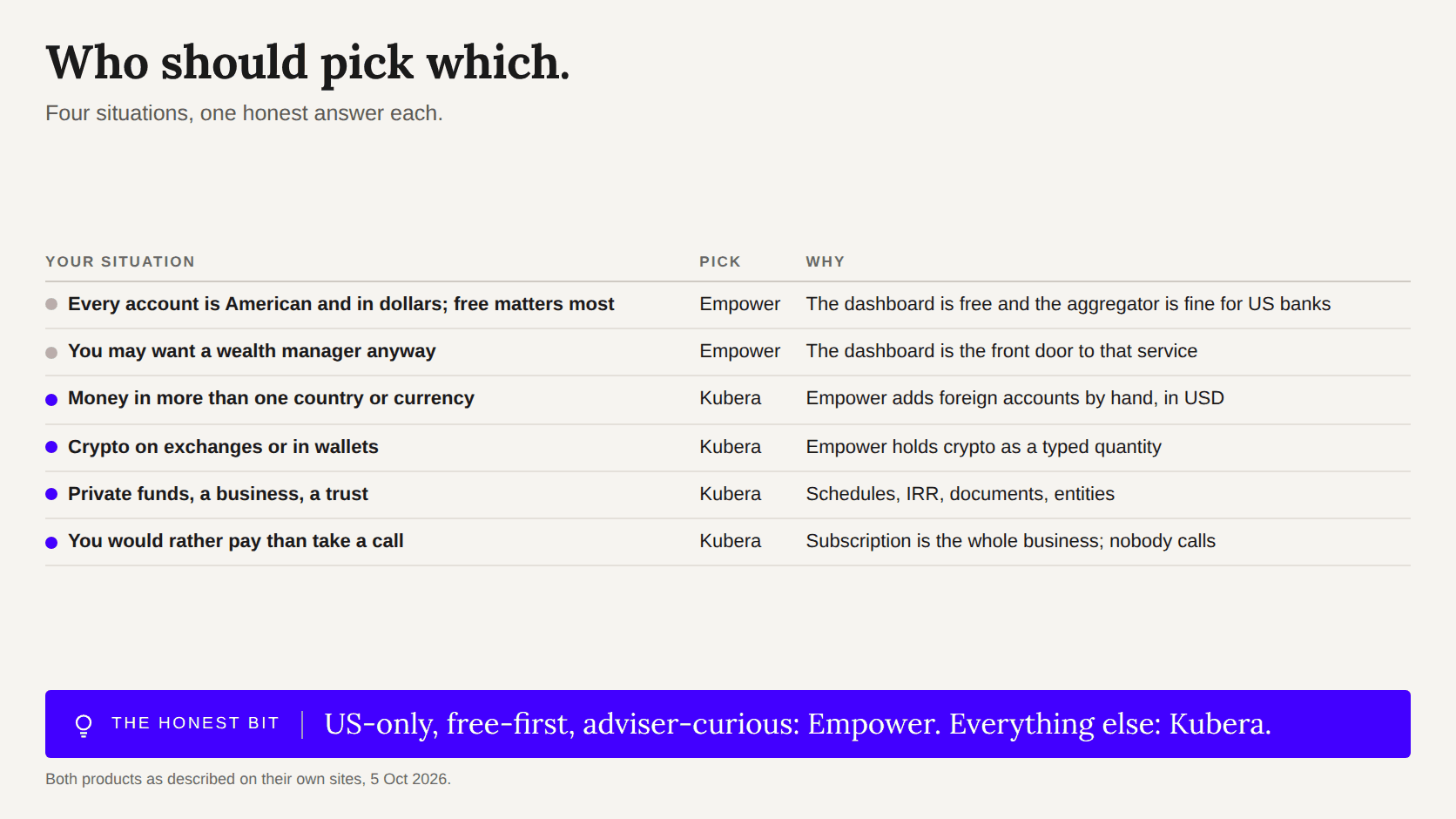
Empower’s native iOS and Android apps are ahead of Kubera’s mobile web app, which is built for viewing rather than editing. Empower has a retirement-fee analyser for US 401(k) funds and a basic cash-flow view; Kubera does neither, deliberately. And Empower is free. If every account you have is American, you do not hold crypto on an exchange, and you want an occasional adviser conversation, Empower is a sensible choice and this page has nothing to argue with.
There is no import to do. Connect the same institutions in Kubera (most take under a minute each), add anything that does not connect, and your daily history starts that day. Kubera does not backfill history from before you joined, and Empower cannot export its history to another app, so the first week is the only week where Empower’s chart is longer than yours. The 14-day trial is the full product, needs no card, and ends by itself if you do nothing.
“I loved Personal Capital until they were absorbed by Empower, but Kubera is much better than that app was even at its peak.”
“I was using Empower for many years. After issues with it not updating my accounts and lack of new features, I tried Kubera.”
“No gimmicks, no upsells, no ads trying to push me into some affiliate product. Kubera makes its money from my subscription, and it shows in how the product respects my time and data.”


