Compare · Kubera vs Copilot  ·  Last checked 5 October 2026. Prices and limits quoted from each product’s own site; nothing here is a screenshot of anyone else’s app.

Copilot is the budgeting app Apple users recommend to each other: fast, beautifully designed, $95 a year, and limited to US institutions in US dollars on Apple devices and the web. Kubera is a net-worth tracker with no budget at all, built for people whose money is spread across countries, currencies, exchanges and private deals. They solve different problems, so this page is mostly about which problem is yours.
Pick Kubera if

You want to know what you own and owe, everywhere, every day.

  • Any of your money is outside the US, or not in dollars.
  • You hold crypto beyond the big exchanges: DeFi, NFTs, chains other than Bitcoin and Ethereum.
  • You have private investments, a business or property that needs cost basis, documents and history.
  • You use Android, or want your balance sheet readable by an AI assistant.
Pick Copilot if

You want to run your month on an iPhone and like it to look good.

  • You want a budget: categories, recurring charges, a monthly plan.
  • Every account is at a US institution and in dollars.
  • You live on iPhone, iPad or Mac and value design and speed.
  • You want the lower price: $95 a year, with a one-month trial.
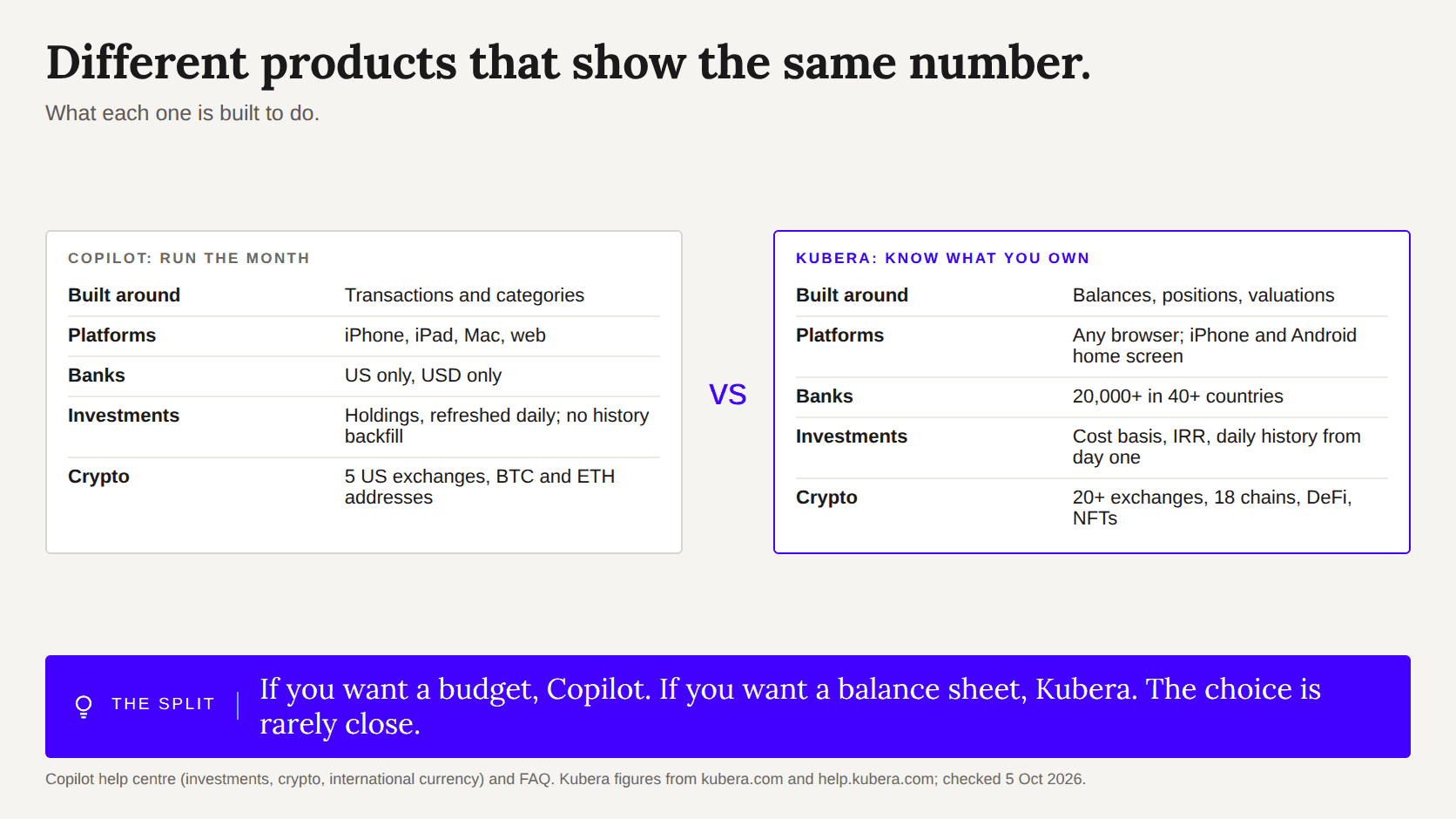
Two cards: Copilot is a US-only Apple budgeting app; Kubera is a worldwide balance sheet on any device

Side by side

Facts checked on 5 October 2026. Competitor prices and limits come from their own sites and help centres where they publish them; where they do not, the page says who reported the figure.

KuberaCopilot
PriceEssentials $250 a year. Black $2,500 a year. 14-day free trial, no card.$13 a month or $95 a year. One-month free trial.
What it isA net-worth tracker for every asset and debt, with history, performance and forecasts.A budgeting and spending app with investment and net-worth views.
PlatformsWeb, installable on iPhone and Android home screens. Mobile is built for viewing.iPhone, iPad, Mac and web. No Android app.
Countries and currenciesInstitutions in 40+ countries; any currency; rates refreshed every two hours.US institutions only, USD only, no conversion. US App Store only.
InvestmentsTicker, quantity, cost basis; IRR per position; benchmarks; non-US exchanges priced; daily history from day one.Holdings, allocation, average cost and total return where the institution provides them; benchmarks; holdings refresh once a day; no backfill of history; no CSV import.
Crypto20+ exchanges, hardware wallets, 18 chains, DeFi positions, NFTs.API links to Coinbase, Kraken, Gemini, Binance.US and Bitstamp; public BTC and ETH addresses; Ledger and Trezor via xPub. No DeFi or other chains mentioned.
Private investmentsCommitments, calls and distributions on a schedule; IRR; documents.A manual account with a value.
Manual assetsHomes, cars, collectibles, loans made, gold; live price feeds and an AI appraiser keep values current.Cars, property, art, jewelry and metals as manual accounts.
Household and entitiesCollaborators on every plan; nested portfolios and ownership tags on Black.Single user.
AIConnect to ChatGPT, Claude, Grok and other assistants, read-only.AI categorisation of transactions.
If you dieDead Man’s Switch sends your data to the person you named.None.
PrivacyNo ads, no data sales.No ads, no data sales; subscriptions only.

Different products that happen to show the same number

Copilot is a budgeting app, and a good one. It pulls transactions from US banks and cards, categorises them with some help from AI, and shows you spending, recurring charges and a net-worth line. Kubera does none of the first three. It tracks balances, positions and valuations, every day, for everything you own, and leaves the monthly budget to other apps.

So the choice is rarely close. If the thing you want is a budget, Copilot. If the thing you want is a balance sheet, Kubera. If you want both, people run both: Copilot for the month, Kubera for the net worth.

Where Copilot stops

Copilot supports US financial institutions only and shows everything in US dollars; its help centre says foreign-currency transactions arrive at whatever dollar figure the data provider sends, with no conversion. It is sold only in the US App Store, and there is no Android app. For investments, it refreshes holdings once a day, does not backfill history before you connected, and cannot import a CSV.

Kubera connects to institutions in 40+ countries through nine aggregators, holds every asset in its own currency, runs on any device with a browser, and starts a daily history the day you connect. If an account will not connect, Web Sync or AI import keeps it current without re-typing.
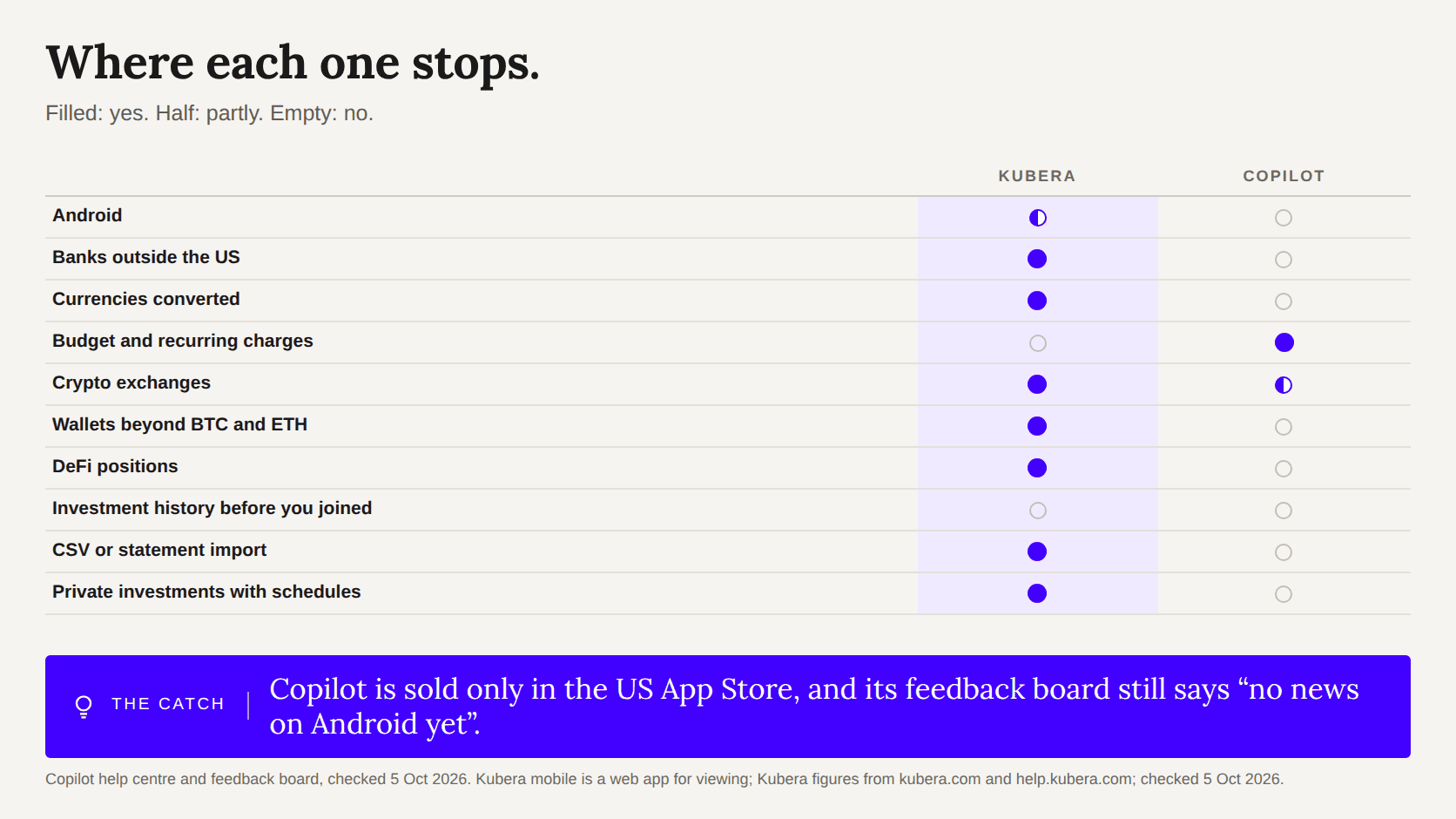
Feature matrix: Copilot has the budget; Kubera has Android, non-US banks, currencies, wallets, DeFi, imports and private investments

Crypto: broad on Copilot, deeper on Kubera

Copilot connects to five US exchanges by API, reads public Bitcoin and Ethereum addresses, and supports Ledger and Trezor through xPub keys. That covers most people. Kubera adds the rest: 20+ exchanges, 18 chains by wallet address, DeFi positions on Ethereum, BSC and Polygon, NFTs, staking and lending, with stablecoins treated as cash on your balance sheet.

Where Copilot is better

Copilot is faster, prettier and native on Apple devices; Kubera’s mobile is a web app built for viewing rather than editing. Copilot has a budget, recurring-charge detection and spending insights, none of which Kubera offers. It costs $95 a year against $250. If you are a US-only, Apple-only person who wants to manage the month, Copilot is the right answer and Kubera would be the wrong one.
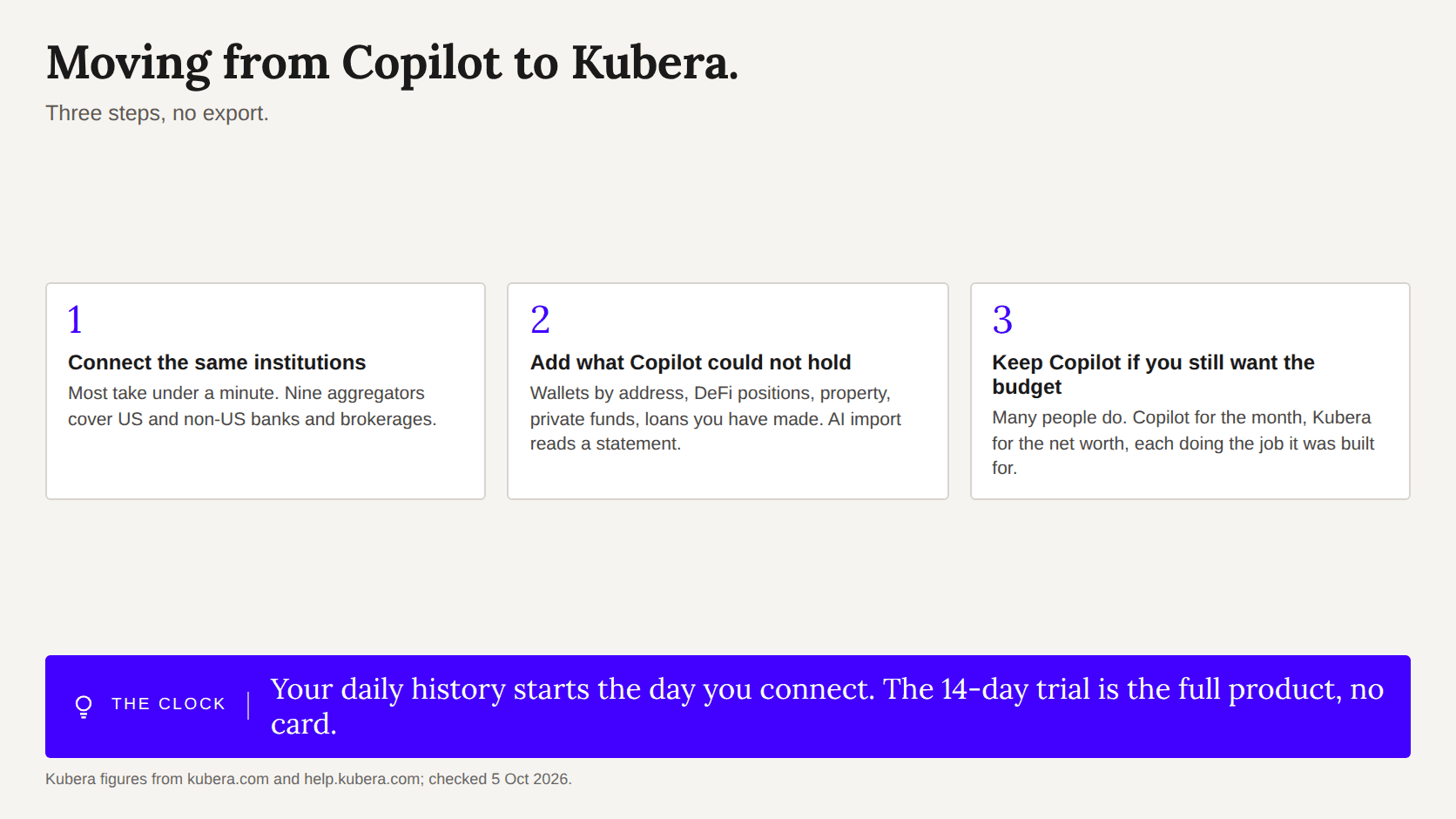
Three steps: connect institutions, add what Copilot could not hold, keep Copilot for budgeting if wanted

Moving from Copilot to Kubera

There is no export to bring across. Connect your institutions in Kubera (most take under a minute), add the things Copilot could not hold, and the history starts that day. The 14-day trial is the full product, no card, and ends by itself if you do nothing.

People who moved to Kubera from Copilot

“Instead of spending hours updating balances and tracking investments, Kubera automates everything, giving me a clear, real-time view of my finances in one place.”

Greg K, verified review

“Before Kubera, I was cobbling together spreadsheets and logging into a dozen different platforms just to answer the basic question: 'What's my actual net worth?'”

James M, verified review

“Gives you a 10,000 foot view of all your investments and accounts. Really does a great job surfacing key information. Also love that there is no ads!”

CJ B, verified review
★★★★★ 4.8 out of 5 from 1,600+ verified reviews · Read them, including the critical ones

Questions people ask

Does Copilot work on Android?
No. Copilot runs on iPhone, iPad, Mac and the web; its feedback board says there is no news on an Android app. Kubera runs in any browser and installs on Android and iPhone home screens.
Does Kubera have a budget?
No, and it is not planned. Kubera tracks what you own and owe. People who want a budget pair it with Copilot or a similar app.
Can Copilot track accounts outside the United States?
No. It supports US institutions only and shows US dollars only. Kubera connects to institutions in 40+ countries and holds assets in any currency.
Which is better for crypto?
Copilot covers the big US exchanges and BTC/ETH addresses. Kubera connects to 20+ exchanges and 18 chains, including DeFi positions and NFTs, alongside everything else you own.
Is there a Kubera app?
Kubera is a web app that installs on an iPhone or Android home screen. Mobile is best for checking your net worth and charts; adding and organising assets is easier on a desktop.
Sources and when they were checked
  1. Copilot: price and trial — https://www.copilot.money/, checked 5 October 2026
  2. Copilot: Android status — https://feedback.copilot.money/feature-requests/p/copilot-android-app, checked 5 October 2026
  3. Copilot: international currency — https://help.copilot.money/en/articles/10715424-international-currency, checked 5 October 2026
  4. Copilot: data providers — https://help.copilot.money/en/articles/10768078-how-do-you-get-my-financial-data, checked 5 October 2026
  5. Copilot: investments tab — https://help.copilot.money/en/articles/5377645-investments-tab, checked 5 October 2026
  6. Copilot: investment limitations — https://help.copilot.money/en/articles/10262766-investment-account-limitations, checked 5 October 2026
  7. Copilot: crypto support — https://help.copilot.money/en/articles/6162313-crypto-support-with-copilot, checked 5 October 2026
  8. Copilot: physical assets — https://help.copilot.money/en/articles/10760871-tracking-your-car-and-other-physical-assets, checked 5 October 2026
  9. Copilot: FAQ (no ads, no data sales) — https://www.copilot.money/faq, checked 5 October 2026
  10. Kubera help: crypto exchanges and chains — https://help.kubera.com/article/68-track-latest-value-of-your-crypto-wallet, checked 5 October 2026
  11. Kubera help: DeFi — https://help.kubera.com/article/53-how-to-track-defi-assets, checked 5 October 2026
I've used tons of net worth tracking apps. Kubera is my favorite by FAR. I have zero affiliation. I'm pretty sure it's a tiny team. But they've been launching so many cool features and are moving fast.
Sam Parr
Co Founder @ Hampton
Kubera has proved to be the best product we’ve found for expats — both those moving to the United States and Americans moving abroad — to manage their global investments and track them in the currency of their choice.
Keith Poniewaz, Ph.D.
Partner | Director of International Advisory Services @ Walkner Condon Financial Advisors
Two Prices
Not based on wealth. Based on complexity.
A wealth manager charges 1%. On $25 million, that's $250,000 a year. We kept the 250 and dropped the zeros.
kubera
Essentials
Everything except what's listed under Black
$250/year
kubera
Black
For complex multi-entity wealth.
Kubera Black customers get the Essentials plus...
  • Ownership tags: tag assets by owner across people, trusts, and entities. Details
  • Nested Portfolios: independent portfolios per person, trust, or entity, track money flowing between them and granular access control. Details
  • Guided Onboarding: get help fine-tuning your setup.
  • VIP Support: priority Email support and 1:1 Zoom calls
$2500/year
Try it fully loaded. Choose the subscription plan after the trial.
Try for 14 days
Try the fully loaded version.
Choose the subscription plan after the trial.
for firms
Kubera White Label
A Kubera balance sheet for every client, branded as yours.
Learn More