Kubera · AI assistants · Gemini

Kubera works with Gemini.

Add Kubera as a connected app and Gemini can read your whole balance sheet: every bank, brokerage, crypto wallet, private fund, property, trust and entity.

It can update it too, once you say yes: add to a holding, log a dividend from your inbox, revalue a fund from its statement.

Free for 14 days. No card. Nothing to cancel.

What will you ask?
“Chart my net worth over the last 3 years and point out the biggest jumps and drops.”
KuberaFrom $5.83M to $17.44M, +199%. Peaked at $22.48M in July 2024; down 21.5% since the Sept 2024 start date.
LiveKubera ⇄ Gemini, read and writeConnected appOne address, one sign-inWeb and mobileConnect once on the web, use it in the appYour switchRevoke it in Kubera any time

Gemini can

  • ✓Read every account, balance and its history
  • ✓Answer across entities, currencies and asset classes
  • ✓Read your recap reports, cost basis and cash flows
  • ✓Update it: add to a holding, log a dividend, revalue a fund. Proposed first, applied after you say yes

Gemini cannot

  • ×Move money or start a transaction
  • ×See your bank logins. Kubera never stores them.
  • ×See anything you haven’t put in Kubera

Set up in about two minutes

Gemini takes custom apps by address. You give it Kubera’s, sign in once, and Kubera sits in your Connected apps from then on, on the web and in the Gemini mobile app.

Step 1 of 7

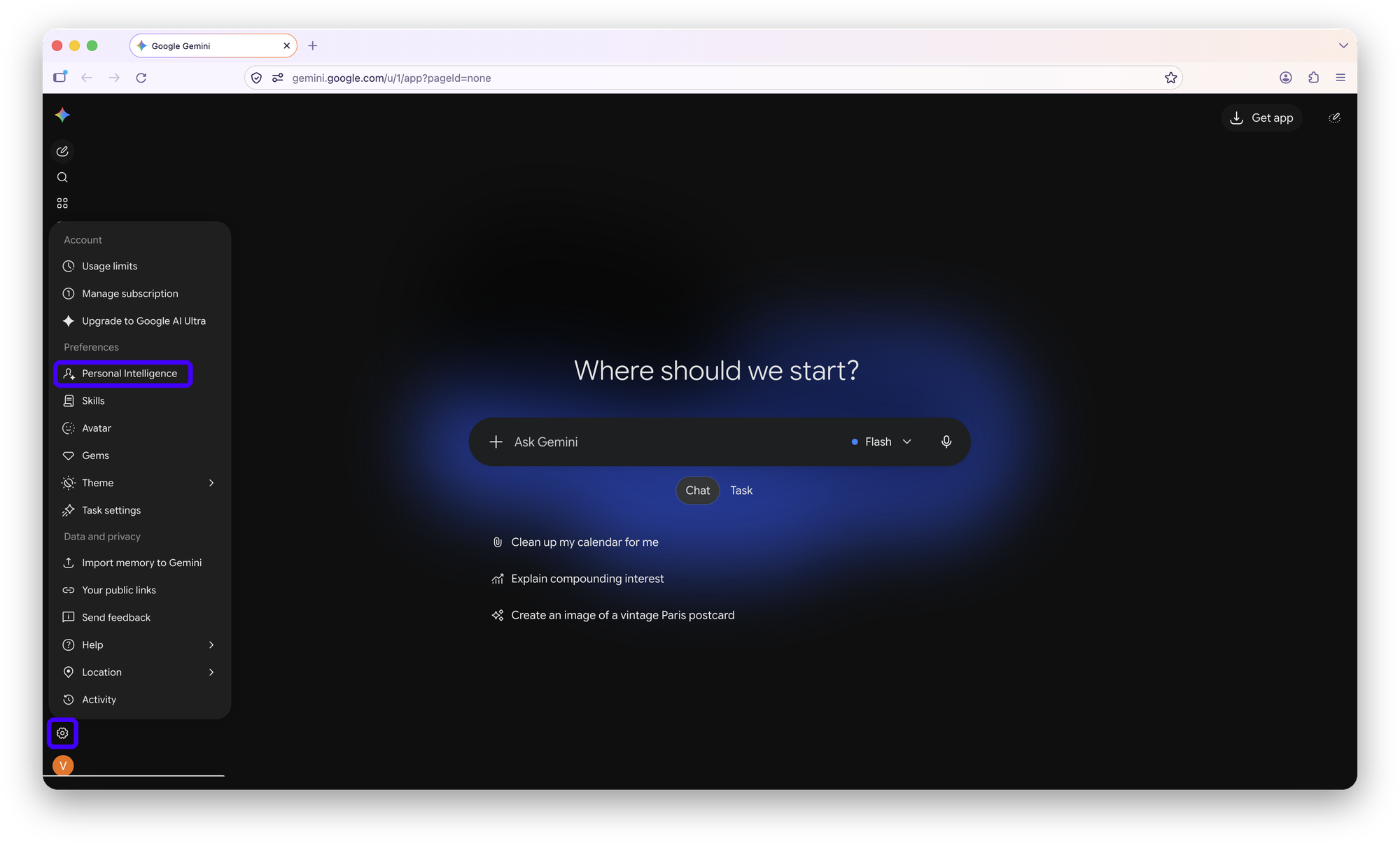
Open Settings, then Personal Intelligence

In Gemini on the web, click the gear at the bottom of the left sidebar, then Personal Intelligence.

Pagegemini.google.com/appOpen
Gemini settings menu open from the gear icon, with Personal Intelligence highlighted
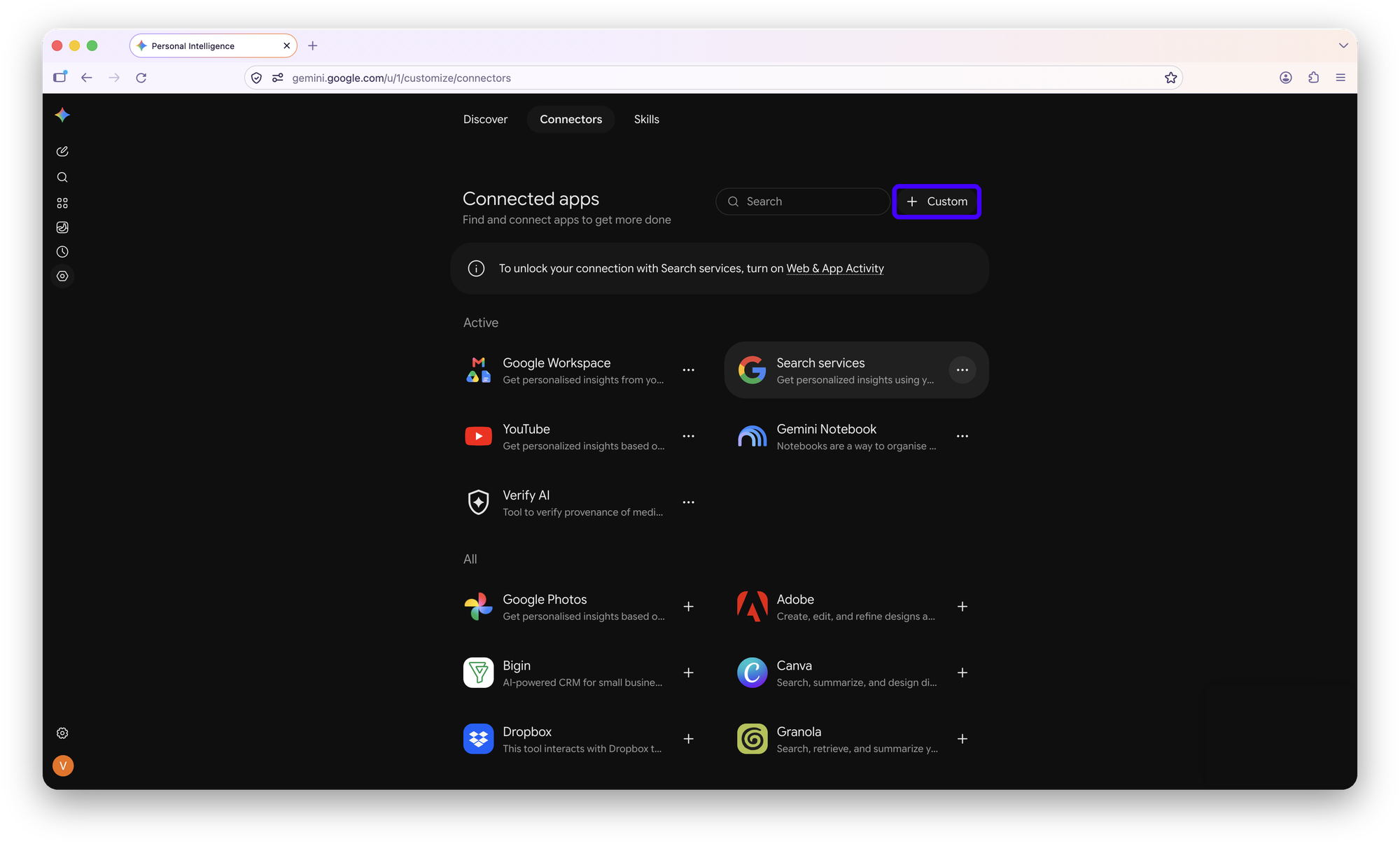
Step 2 of 7

Connected apps, then + Custom

Open Connected apps and click + Custom at the top right. A “Connect to an MCP server” box opens.

Gemini Connected apps page with the + Custom button highlighted
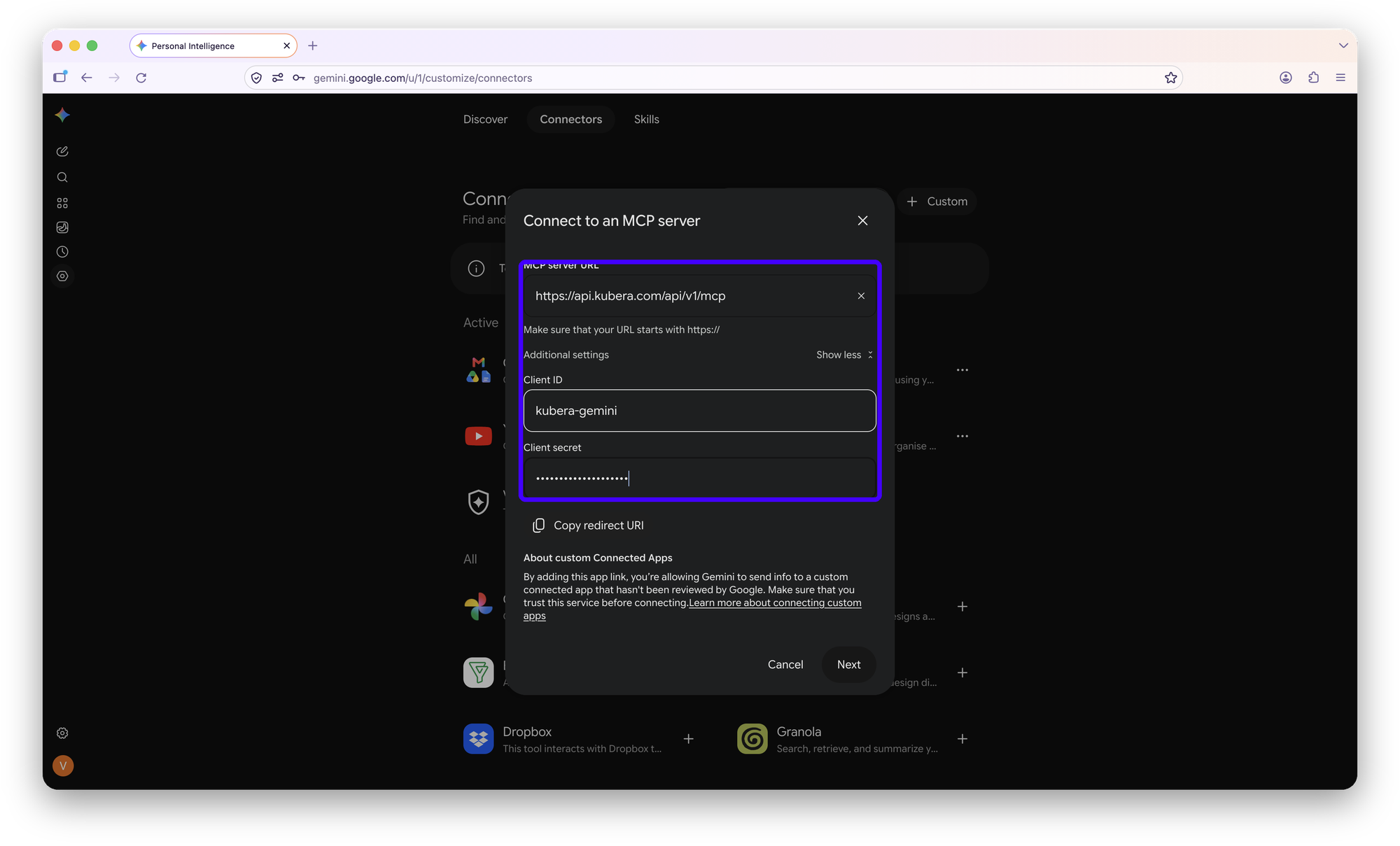
Step 3 of 7

Paste Kubera’s address and credentials

Enter the MCP server URL. Then open Additional settings (Show more) and enter the Client ID and Client secret. The secret is the same for everyone; it only tells Gemini which app is asking. Click Next.

MCP server URLhttps://api.kubera.com/api/v1/mcpCopy
Client IDkubera-geminiCopy
Client secretkubera-gemini-publicCopy
Connect to an MCP server dialog with Kubera's server URL, client ID and client secret filled in
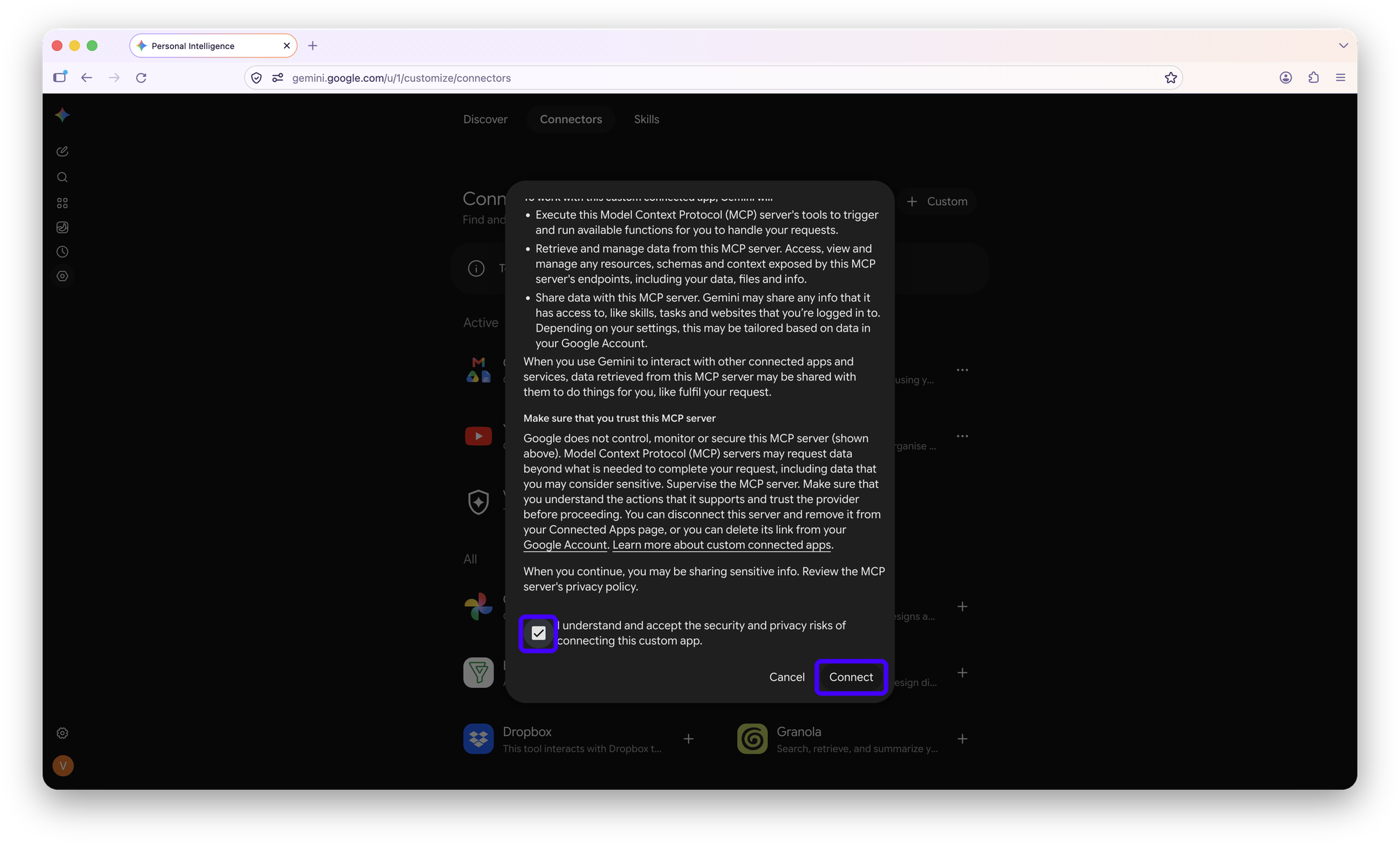
Step 4 of 7

Accept and Connect

Gemini explains what a custom app can do: run its tools, read and manage its data. Tick I understand and accept, then click Connect.

Gemini custom app notice with the acceptance checkbox and Connect button highlighted
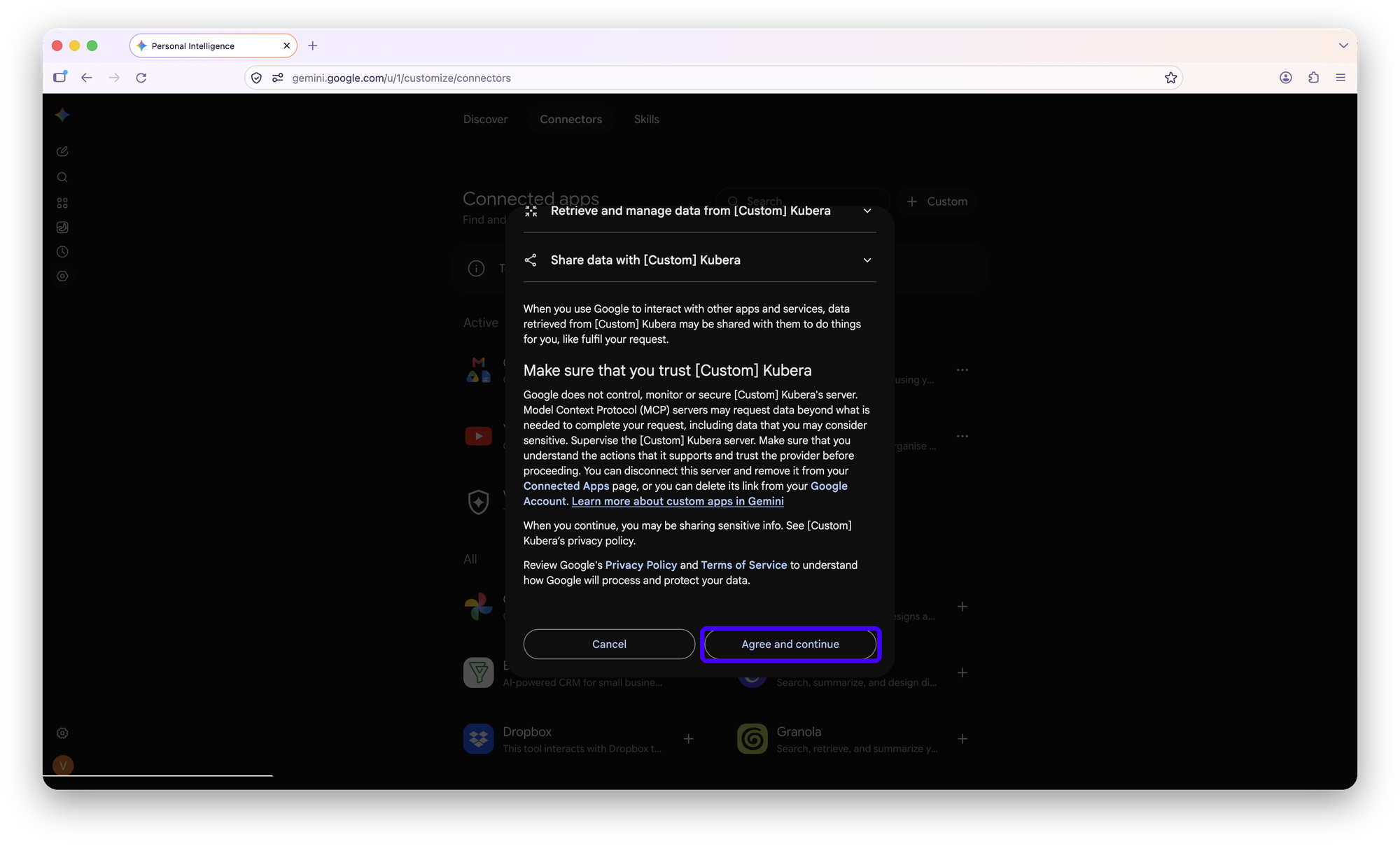
Step 5 of 7

Link the accounts in Google

Google shows the link it is about to make between your Google Account and Kubera. Click Agree and continue.

Google dialog linking your Google Account and Kubera, with Agree and continue highlighted
Step 6 of 7

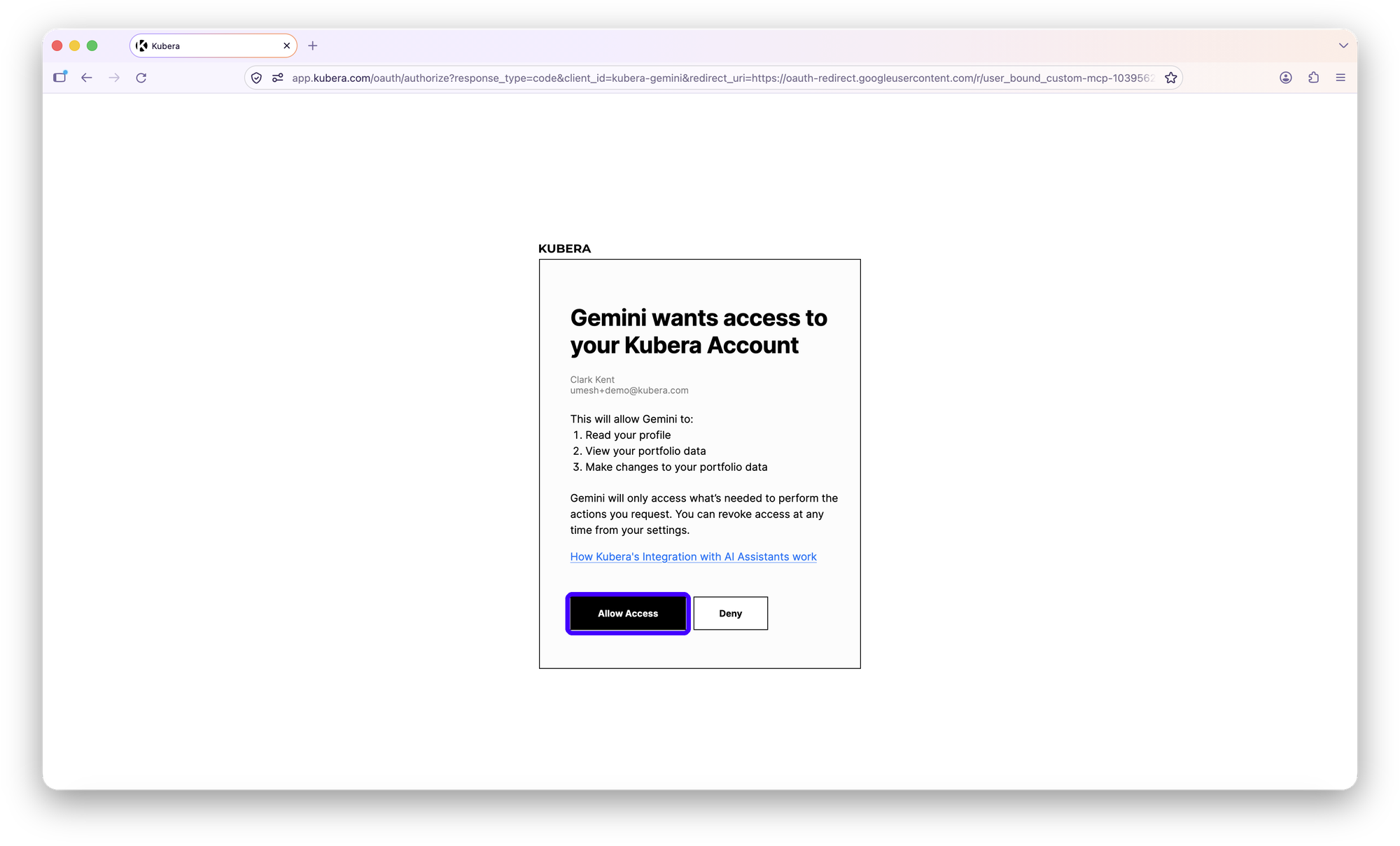
Allow access in Kubera

A Kubera page opens showing exactly what Gemini will be able to do: read your profile, view your portfolio data, make changes to it. Click Allow Access.

Kubera page saying Gemini wants access to your Kubera account, with Allow Access highlighted
Step 7 of 7

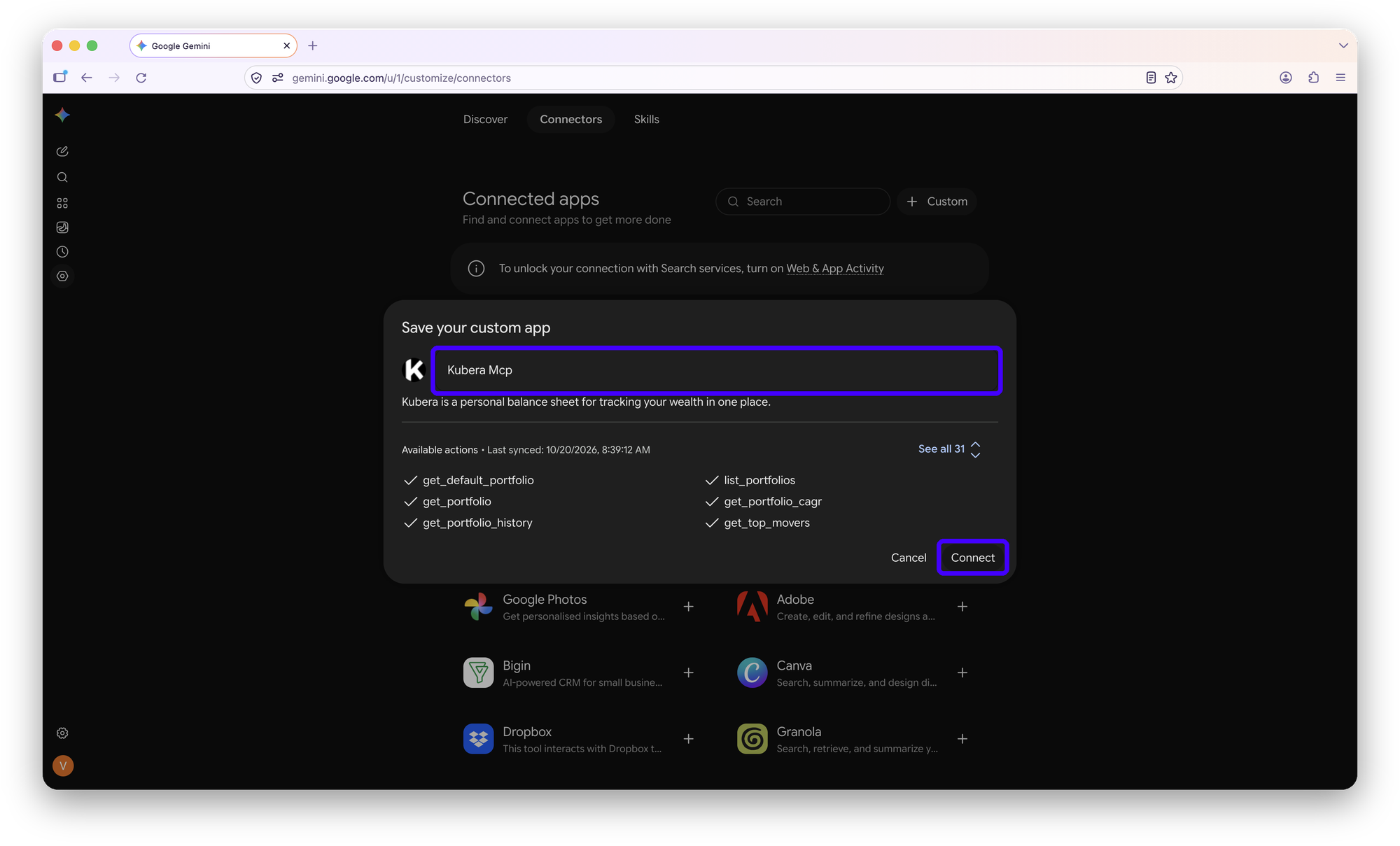
Name it Kubera and Connect

Gemini shows the app with its 31 actions. Rename “Kubera Mcp” to Kubera and click Connect. From now on, in any chat, type @Kubera, pick it from the list, and ask.

In chat@Kubera What’s my net worth?Copy
Gemini Save your custom app dialog showing Kubera's 31 actions, with the name field and Connect highlighted

Who can add custom apps. Google opens custom connected apps to personal Google Accounts, 18 and over, in the US, in English, with Keep Activity turned on. Work and school accounts can’t add them yet. Once connected on the web, Kubera is there in the Gemini mobile app too.

Kept the default name? Then it answers to @Kubera Mcp instead of @Kubera. You can rename it any time in Connected apps.

What to ask

Type @Kubera at the start of a message and Gemini reads your balance sheet live before it answers. Two examples from the demo account, as Gemini answered them.

Example 1 · The long view

Three years, with the jumps and drops

One question, and Gemini read 36 months of net worth history, found the peak, and noticed that the portfolio’s official start date changes the story.

KuberaChart my net worth over the last 3 years and point out the biggest jumps and drops.

Over the last three years (November 2023 to October 2026) your Clark portfolio grew from $5.83M to $17.44M, a net increase of $11.61M (+199.1%). Your official start date in Kubera is September 30, 2024 ($22.22M); measured from there, net worth is down $4.78M (−21.5%). The full window catches the mid-2024 onboarding of your holding company and real estate entities.

Starting net worth, 3-year window$5,830,692November 30, 2023
3-year peak$22,479,920July 31, 2024
Official start date$22,222,396September 30, 2024
Today$17,442,335$18.86M assets, $1.41M debt
Example 2 · Private investments

Committed, called, and what’s left

Kubera tracks committed capital, cash flows, cost basis and fund schedules per holding. Gemini pulled all four across fifteen positions and totalled them.

KuberaSummarize my private investments: total committed, called, distributed, and what’s still uncalled.

Fifteen private investments under the Private Stocks sheet (VC Investments and Private Equity) in your Clark portfolio, $2,102,766 in current NAV.

Current value (NAV)$2,102,766$1,902,766 across 13 VC holdings, $200,000 across 2 PE holdings
Committed capital$475,000NovaBridge Capital $400K, Alpha Partners $50K, Wayfinder Ventures LP $25K
Paid in / called$1,692,500$610,000 of it from logged cash flows across 4 holdings

Gemini can update Kubera too

Reading is the default. Changing anything takes two yeses: Gemini shows the before-and-after and asks, then shows its own Allow card for the Kubera action. Nothing moves until you confirm both.

1 · Change a holding

Add to a position in one line

Say what changed. Gemini finds the holding, works out the new quantity, shows the value Kubera will calculate, and waits.

After you say yes, Gemini asks once more with an Allow / Deny card for the update. Click Allow. It is Gemini’s guard, not Kubera’s, and it appears on every change.

KuberaAdd 0.5 BTC to my Bitcoin asset in the crypto sheet.

Found Bitcoin in your Clark portfolio under Crypto › Bitcoin (Coinbase, BTC). Before I update it, confirm the change:

Quantity5 BTC→5.5 BTC
Estimated value~$409,554→~$450,509

Value is calculated by Kubera from the live BTC price, not typed in.

Yes
✓ Bitcoin updated to 5.5 BTC in the Crypto sheet
2 · Inbox to cash flow

Log dividends and capital calls from email

With Google Workspace connected in Gemini, it can search the month’s notices, list every amount with its source, and propose the cash flows. Dividends land as Cash Out; a capital call as Cash In.

KuberaCheck my Gmail for dividend and capital-call notices this month and log them.

Two dividend notices and one capital call found. Proposed cash flows:

Dividend · Cash Out$4,812.40 received
Dividend · Cash Out$1,206.15 received
Capital call · Cash In$150,000 to pay
Yes
✓ Three cash flows added in Kubera

More to try, reads and updates. Type @Kubera in Gemini first, then click one to copy and paste it after.

What is my current net worth, and how has it changed this year?Which accounts haven’t updated in 30 days?How much cash is sitting idle across all my accounts?What are my unrealized gains, based on cost basis?Which single holding is my biggest concentration risk?List every capital call due in the next 90 days.Compare my portfolio CAGR with the S&P 500 since I started tracking.What did my net worth look like on this day last year?Add the shares I bought today to my Fidelity brokerage account.Revalue my 420 Laf Ave property to the new appraisal.Log the latest Wayfinder Ventures distribution as Cash Out.Every Monday, send me a net worth snapshot from Kubera with what changed.Draft a one-page summary of my balance sheet I can share with my accountant.

Privacy, in short

Gemini sees only what you have put in Kubera, and only while it is answering you. It never sees your bank logins, because Kubera never stores them.

See my whole net worth

Free for 14 days. No card. Nothing to cancel.

If something’s off

Five things that come up, and the fix for each.

There is no + Custom button, or custom apps are greyed out
Custom apps need a personal Google Account (not work or school), 18 and over, in the US, with Keep Activity on. Check Settings, Activity, and sign in with a personal account.
@Kubera doesn’t appear in the list
You may have kept the default name. Type @Kubera Mcp instead, or rename it to Kubera in Settings, Personal Intelligence, Connected apps.
Gemini answers from memory, not from Kubera
Start a new chat and put @Kubera at the front of the message. The mention is what tells Gemini to fetch live data.
An Allow / Deny card appears on every change
That is Gemini’s own guard for custom-app actions. Click Allow when the tool shown is the one you asked for; Deny stops it.
Numbers look old
Gemini reads whatever Kubera holds right now. If a linked account hasn’t refreshed, refresh it in Kubera and ask again.

Questions

Do I need a paid Gemini plan?

Google doesn’t list a plan requirement for custom connected apps. What it does require is a personal Google Account, 18 or over, in the US, in English, with Keep Activity turned on. Work and school accounts can’t add custom apps yet.

Does it work on my phone?

Yes. Connect it once in Gemini on the web and it is available in the Gemini mobile app on the same Google Account.

Why does Gemini ask twice before it changes anything?

The first yes is to the before-and-after it shows you. The second is Gemini’s own Allow / Deny card for the Kubera action it is about to run. Both are there so nothing changes by accident.

Can Gemini change things in Kubera?

Yes, when you ask. It can add to a holding, log dividends and capital calls from your inbox, or update a fund from its statement. Every change is shown first and applied only after you confirm. It cannot move money. Everything it changes shows in Kubera’s history.

Does Kubera see my chats?

No. Gemini sends Kubera a request for data, Kubera answers, and that is all Kubera sees.

I use ChatGPT or Claude too. Same setup?

No, each AI connects differently. See the full list of supported AI assistants.

One number. Finally. Ask Gemini about it.

Connect the first account and the balance sheet starts building itself. Add Gemini whenever you like; the data is already there.

Free for 14 days. No card. Nothing to cancel.